TABLE OF CONTENTS
- Overview
- What Trust Score actually is
- Availability
- How It Works
- How is the Trust Score determined?
- What You’ll See
Overview
The Invoice Trust Score helps you approve smarter by highlighting which invoices deserve extra attention. Routine invoices are flagged High Trust, while unusual ones are flagged Low Trust. Approvers can use these ratings to speed up reviews and reduce errors.
Each invoice is labeled High, Medium, or Low Trust based on operational and historical signals such as vendor history, sender familiarity, upload behavior, historical coding patterns, invoice amount behavior, and more.
What Trust Score actually is
Trust Score helps AP teams quickly identify which invoices look routine and which invoices may deserve additional review before approval or payment.
It uses historical invoice behavior and operational signals to surface unusual or unexpected activity directly inside the AP workflow.
Availability
The feature is available to users who:
Are using the new beta user interface
Have ‘Trust Score’ feature enabled on their account
Roles who have ‘Approve Payments’ permission
*If the ‘Trust Score’ feature is not enabled on your account, and you wish to try, then please reach out to your Customer Success Manager or our support team.
How It Works
Each invoice is analyzed using a set of rules that fall into three categories:
Triggers
Flags invoices with clearly unusual traits, like:First invoice from a vendor
AI-generated invoice
Invoice created directly from the Ottimate dashboard
First-time GL or dimension usage
Threshold Checks
Looks at what’s typical in your account for:Invoice total or tax amount
Upload method (email, mobile etc.)
Vendor frequency and sender history
Historical GL / dimension coding behavior
Scoring Logic
High Trust:
Invoice closely matches expected historical behavior, such as familiar vendors, senders, coding patterns, and expected invoice amounts.Medium Trust:
Invoice appears mostly routine but contains limited history, weaker confidence signals, or mild anomalies.Low Trust:
Invoice contains one or more unusual or high-risk signals, such as first-time behavior, unexpected coding patterns, missing information, or unfamiliar senders/vendors.
Trust Score highlights the highest-risk signal detected on the invoice, not an average of all signals.
Note: You can hover over the Trust Score directly from the Invoice List View to quickly understand the signals contributing to the score without opening the invoice.
Trust Score will only show when invoice:
was created after June 1, 2025
is assigned to a location
is a debit invoice
is in a verified or incomplete state
has an ERP vendor assigned to it
How is the Trust Score determined?
The Trust Score highlights the highest-risk signal, not an average of all factors.
That means even if 3 things look routine but 1 signal is risky, the invoice may still be marked Low Trust. This helps avoid costly misses and keeps your team focused on outliers.
For example, an invoice may still be marked Low Trust if it contains a first-time sender or unexpected coding pattern, even if most other signals appear routine.
Note: Trust Scores may skew more conservative (Low/Medium) when an account has fewer than ~100 exported invoices. Trust score strengthens over time as patterns from your vendors become clearer.
What You’ll See
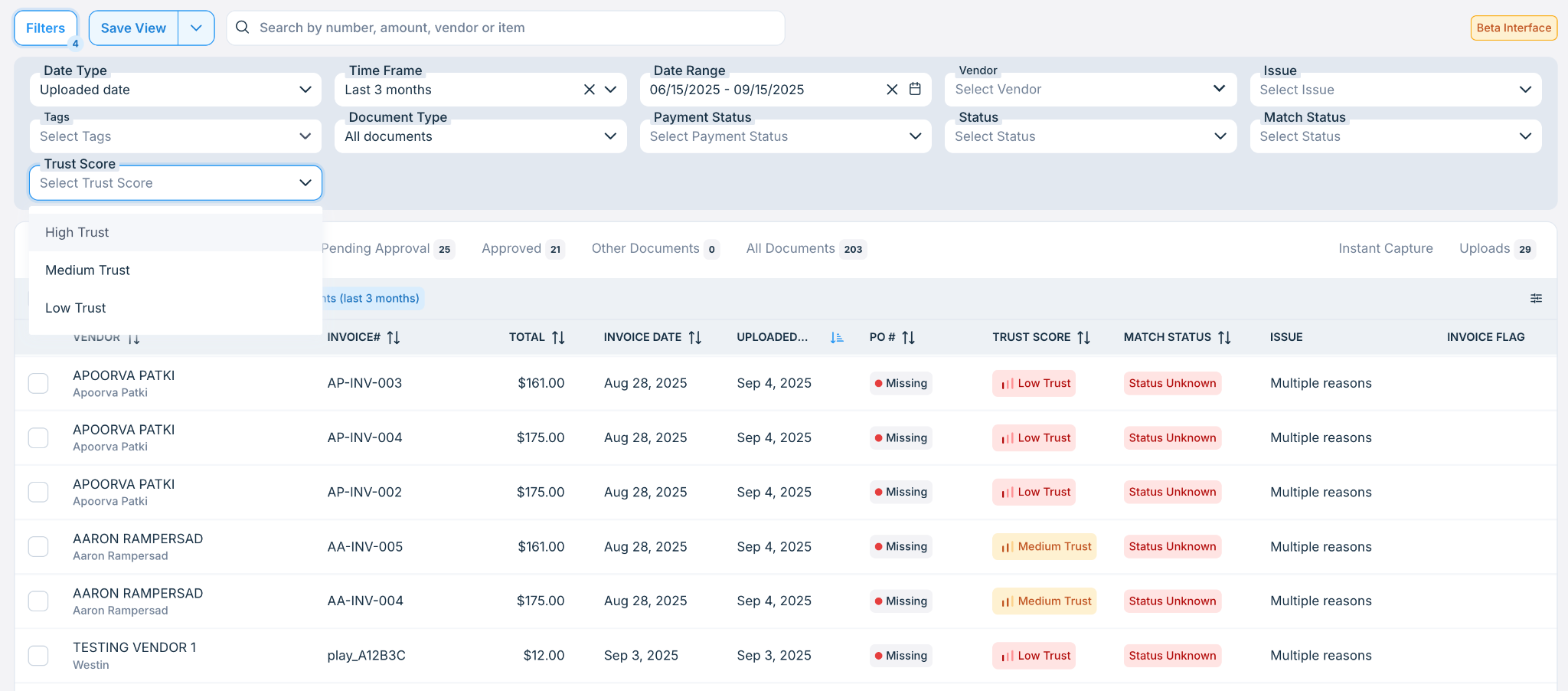
A Trust Score tag on invoices in the Invoices List View, with filters to view High, Medium, or Low Trust invoices:
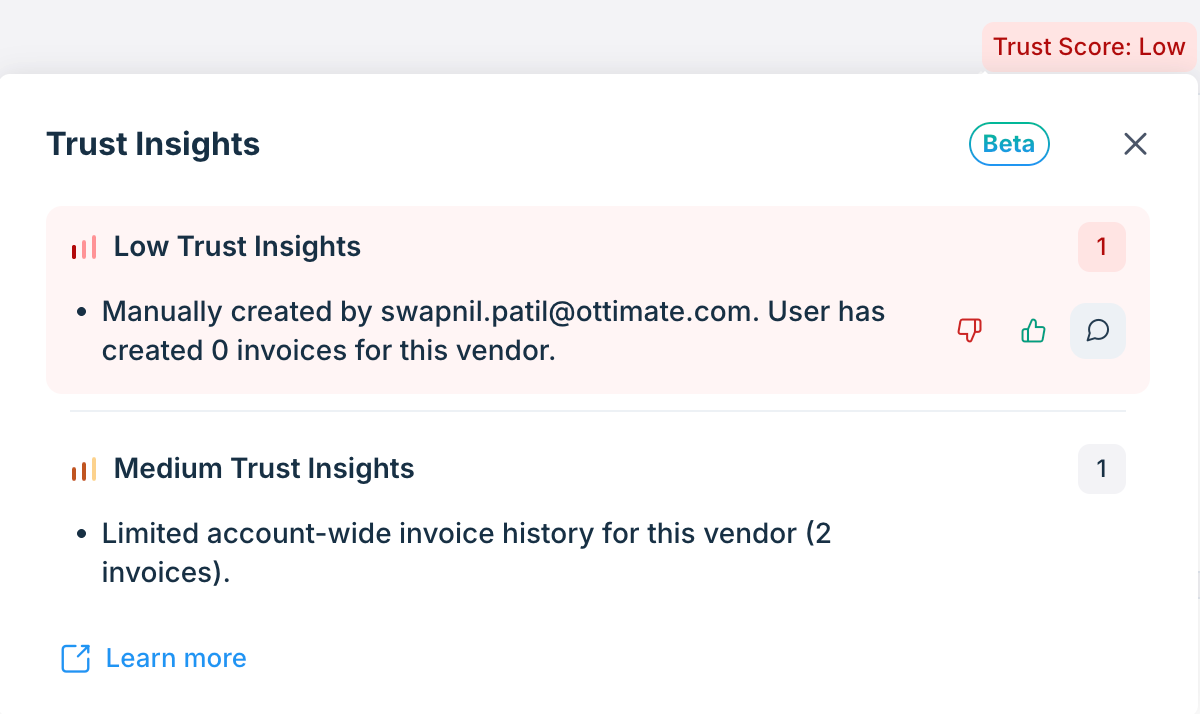
A Trust Score breakdown panel in the Invoice Details view, showing the signals behind the score including unusual vendor, sender, amount, or coding behavior.
Built-in feedback options: give a thumbs up or thumbs down on each insight, or leave a comment to share more context.:
FAQs
Q. Where can I see the Trust Score?
A. You’ll find it on the Invoices tab as a column and in the Invoice Details page, near the top-right corner.
Q. Can I filter or search invoices based on Trust Score?
A. Yes! Use the “Trust Score” filter in the Invoices tab to focus only on Low Trust or Medium Trust or High Trust invoices if needed.
Q. Why is this invoice marked Low Trust even though I know the vendor?
A. Even for known vendors, Low Trust can occur if:
No prior invoices from this sender have been exported
Fewer than 5 similar invoices exist at this location
The amount or tax is outside expected range
The invoice was uploaded manually or from an unfamiliar source
The invoice date is unusually old (e.g. >90 days)
Hover over the score to see the specific reason.
Q. Can I give feedback if a score seems off?
A. Yes! Use the thumbs up or thumbs down buttons next to any insight to let us know if it feels accurate. You can also click the comment icon to leave detailed feedback, which helps us improve Trust Score over time.
Q. Why do invoices from the same vendor sometimes have different Trust Scores?
A. Trust Score is evaluated per invoice, not per vendor. Two invoices from the same vendor may receive different scores depending on amount patterns, sender behavior, upload method, coding behavior, invoice date, and other contextual signals.
Q. Does Low Trust mean fraud?
A. No. Low Trust simply means that one or more signals on the invoice differ from expected historical behavior. Many Low Trust invoices are completely valid and only require an additional review.
Q. Why are manually created invoices sometimes marked Medium or Low Trust?
A. Manually created invoices may initially be scored more conservatively because they bypass some automated ingestion patterns and may have limited historical behavior associated with them.
Additional Information
For further assistance, contact Ottimate Support by emailing Support@ottimate.com or clicking here.
Was this article helpful?
That’s Great!
Thank you for your feedback
Sorry! We couldn't be helpful
Thank you for your feedback
Feedback sent
We appreciate your effort and will try to fix the article