Overview
Self-serve location add-ons allow eligible customers to instantly create new locations directly in Ottimate, expanding your operations without delay!
This is the fastest way to add a location to your dashboard’s existing Group and Company configuration. For more complex setups, please submit a request for Ottimate to create the location on your behalf.
Availability
Self-serve location add-ons are available for eligible accounts and must be enabled on your Ottimate account.
If you see “Add Location” in Settings → Locations: you can add locations directly in Ottimate using the self-serve flow.
If you do not see “Add Location”: contact Customer Support or your Customer Success/Account Manager to request enablement. If your account is currently ineligible, we will reach out once the Self-Serve feature is expanded.
If you prefer Ottimate to add the location for you (or your setup is more complex): create a request using [Submit a Location Add Request]
How It Works
Choose how you want to add a location
Depending on your setup, you can either add a location yourself using self-serve location add-on or submit a request for Ottimate to add it for you.
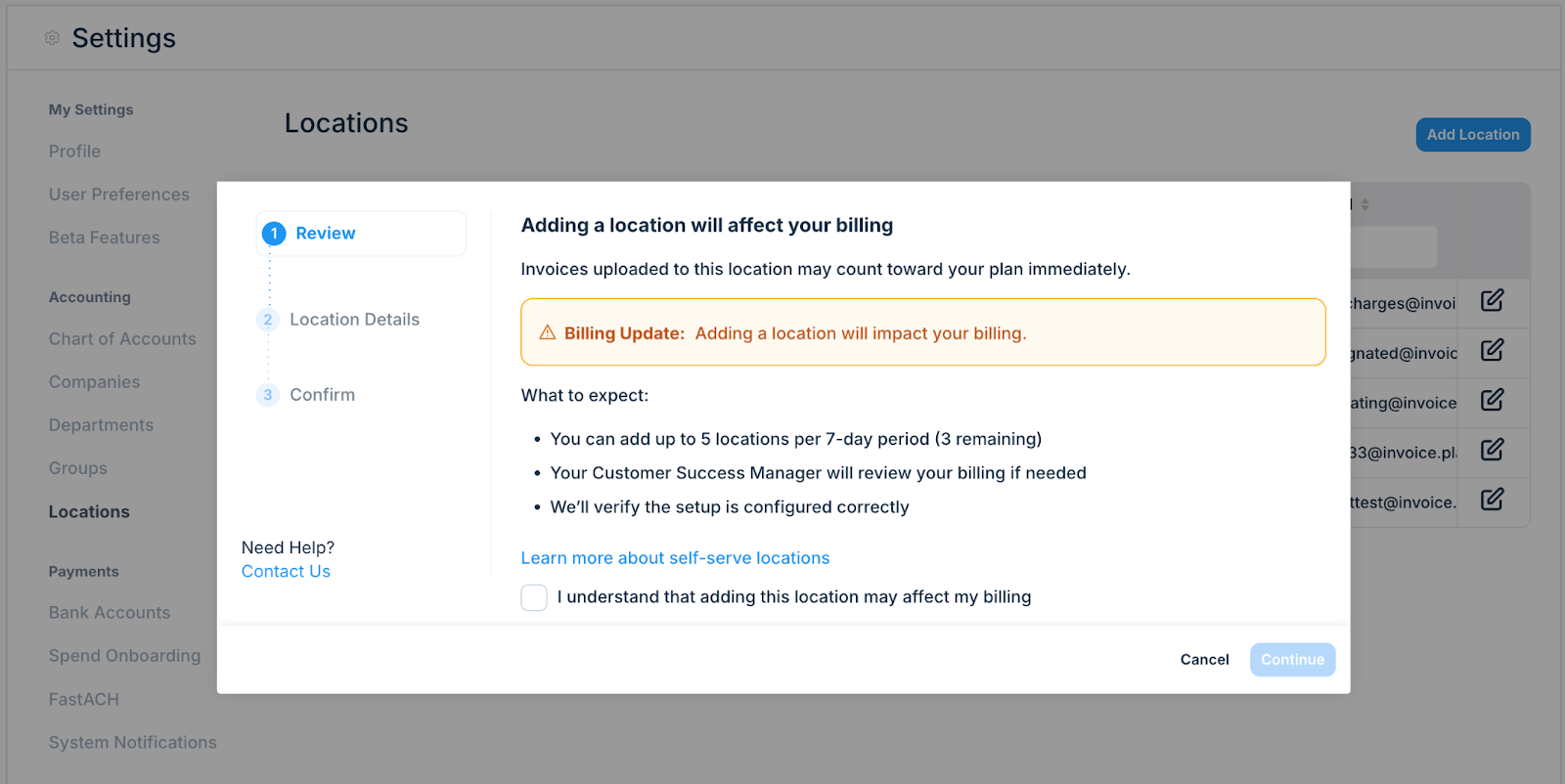
Option 1: Add a location using Self-Serve
Go to Settings → Locations and click Add Location
Review the billing notice and acknowledge that adding a new location may affect billing
Invoices uploaded to the new location will start counting toward your plan immediately once the location is created
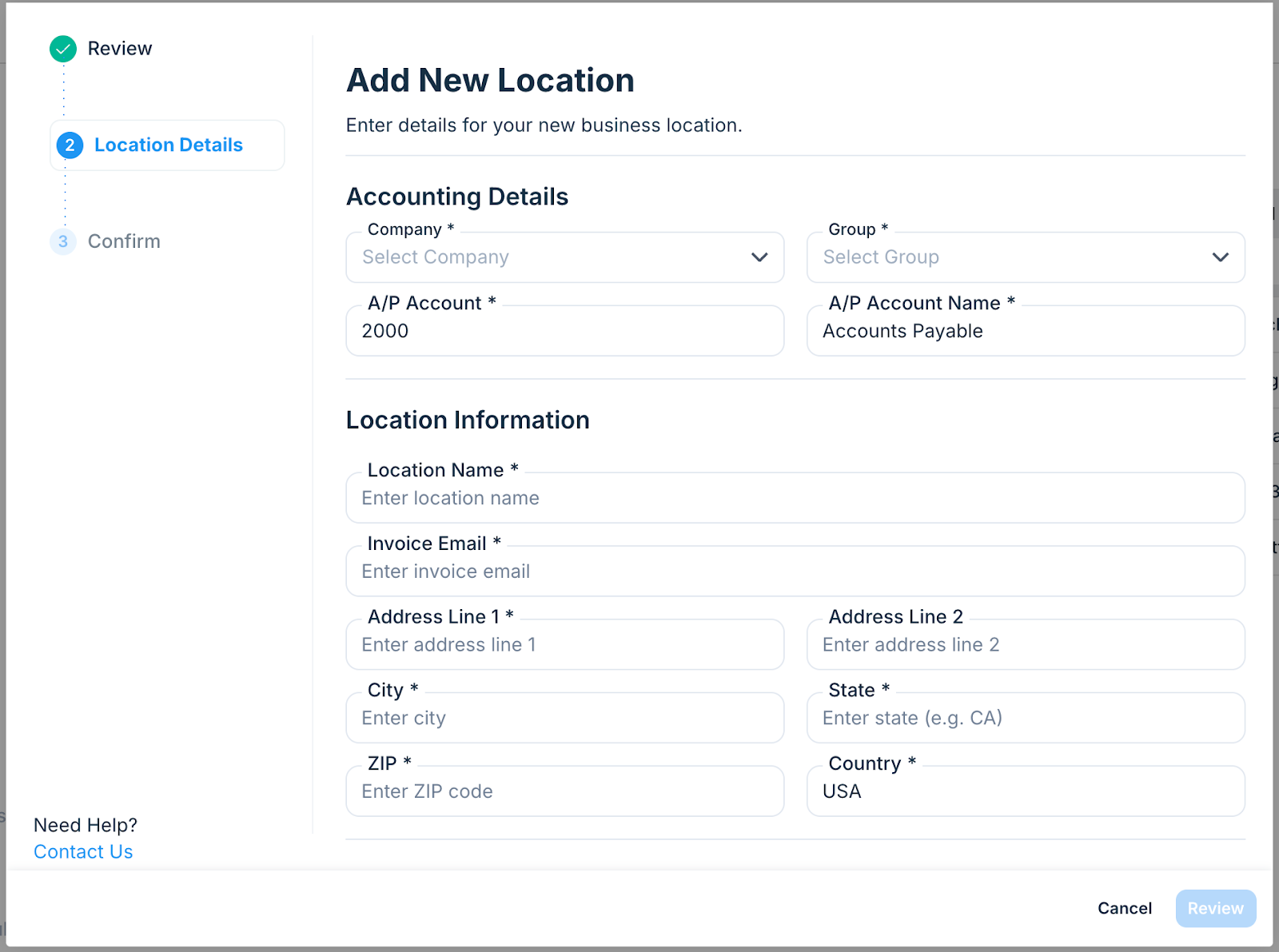
Enter your location details (company, group, address, invoice email, etc.)
Submit the form
Once submitted:
The location is created and becomes active immediately
The location inherits existing features from the selected company
The admin user that creates the location, and any superusers on the account, will gain new location access automatically.
You can begin uploading invoices to the new location right away
Your Customer Success and Onboarding teams are notified automatically for visibility and billing follow-up, if needed.
Option 2: [Submit a Location Add Request]
Use the Location Add Request form when:
You want Ottimate to add the location for you
You need a new company or group created
Your setup requires additional configuration or uploads
You are adding more than five locations in a week
Submitting a request ensures Ottimate can review and configure the location correctly before it is activated.
Need help deciding?
If you’re unsure which option to use, review the FAQs below or submit a request through the Location Add Request form.
FAQs
Q. When should I use Self-Serve Location Add-On?
Use self-serve when you want to add a new location quickly and you can provide the required location details during the in-app flow.
Q. When should I submit a request (Typeform) instead?
Use [Submit a Location Add Request] when:
You want the Ottimate team to add the location on your behalf, or
The new location requires additional setup inputs (e.g. location identifiers for export, new company file/group setup, or module decisions like VendorPay / Spend Management), or
You are adding multiple locations and prefer a bulk, coordinated setup.
Q. What happens after I add a new location?
Once created:
The location becomes active immediately
Invoices sent to that location will begin counting toward your billing thresholds
Our Customer Success and Onboarding teams are notified to review configuration and billing if needed
Q. Why don’t I see the “Add Location” button?
This feature is not enabled for all accounts by default.
If you would like access, please contact Customer Support or your Customer Success Manager to request it.
Q. Can a location be removed if it was added by mistake?
Yes. If a location was added unintentionally or needs to be disabled, please contact Customer Support, and our team will assist you.
Additional Information
For further assistance, contact Ottimate Support by emailing Support@ottimate.com or clicking here.
Was this article helpful?
That’s Great!
Thank you for your feedback
Sorry! We couldn't be helpful
Thank you for your feedback
Feedback sent
We appreciate your effort and will try to fix the article